
Weather - By Xiaomi
Xiaomi Inc.Weather
4.12.95K Reviews
- Version
- G-13.0.2.1
- Installs
- 1.00B
- Age Rating
- Everyone
Screenshots
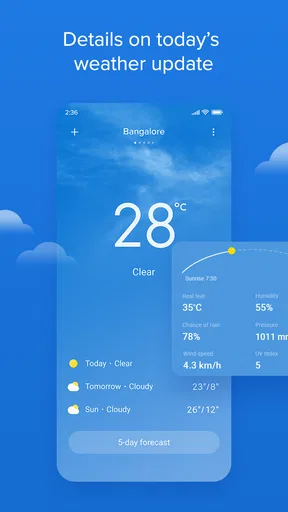
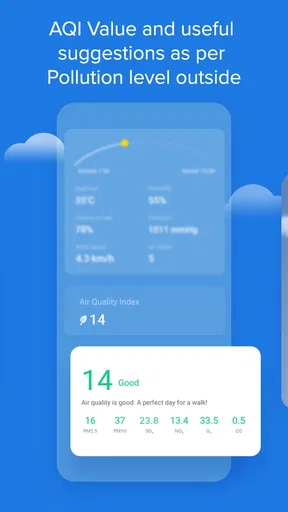
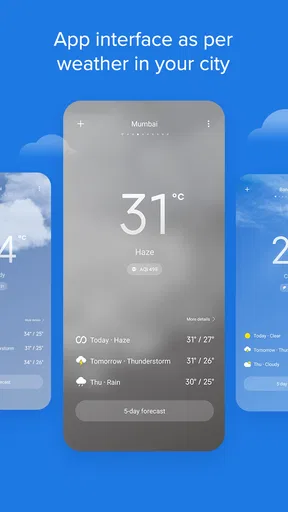
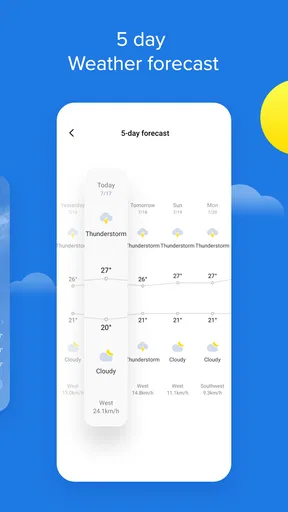
Our Review of Weather - By Xiaomi
 Analysis by Appyee
When I decide whether to trust a weather app, I care less about how many numbers it can display than whether it helps me make a sensible choice before I leave home. Weather - By Xiaomi is built for that everyday check: look at the conditions, consider the forecast, and decide what to wear or carry. It is a free weather app from Xiaomi Inc., rated for Everyone, and its scale is striking: it has passed a billion installs and holds an average rating of 4.1 from around 1.3 million ratings.
That popularity makes it an easy option to try, but it does not automatically make it the right forecast for every place or purpose. I see its appeal in having a quick, familiar view of weather information rather than needing a dedicated setup or an elaborate forecasting workflow. If you mostly want a practical answer to “Do I need a jacket?” or “Should I bring an umbrella?”, that straightforward role matters more than a long list of specialist tools.
What I’d check before relying on it
A forecast is useful only if the location is right. Before treating the displayed conditions as your local outlook, make sure the selected city or location matches where you actually are. This is especially important if you travel, have more than one place you check regularly, or open the app while away from home. A forecast for a nearby city can still differ from what you experience, so I would not assume that a familiar place name is close enough for every plan.
I’d also use the forecast as a planning aid, not a promise. Weather can change, and a single glance cannot remove that uncertainty. For an ordinary commute, checking once before leaving may be enough; for a long walk, an outdoor event, or a drive where conditions matter, I would check again nearer the time. That small habit is more useful than treating any app’s first prediction as settled fact.
The app’s AQI information adds another reason to check beyond temperature. If air quality is part of your daily decision—perhaps because you are planning time outside—it gives you another factor to consider alongside the weather. I would treat that reading as a prompt to make an informed choice, rather than as a medical assessment or a substitute for local health guidance.
Where a simple weather app fits
Weather apps tend to split between quick daily dashboards and services aimed at people who want to study detailed maps or compare many forecast models. Xiaomi’s offering makes the most sense to me as a convenient, general-purpose choice. It is the kind of app I would open for a fast check before dressing, commuting, or deciding whether an outdoor errand can wait.
If your routine depends on a precise, location-specific forecast, a specialist weather service may suit you better, particularly if it offers the particular local detail or forecasting tools you need. That does not make a general app pointless. It means the right choice depends on what you ask of it: quick context for an ordinary day is a different job from planning around changing conditions in a remote area or managing a weather-sensitive activity.
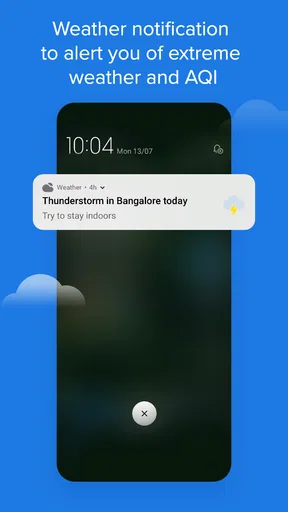
There is also a practical distinction between checking a forecast and receiving a useful warning. Notifications can help when you want to be alerted, but I would keep them focused on conditions that could genuinely change my plans. Too many alerts can become noise, while no alerts at all may mean you miss a change you would have preferred to know about. The best setup is the one that supports your routine without making the phone feel like a constant weather bulletin.
Who should consider it—and who may not
I’d recommend giving it a look if you want a free, accessible way to check the weather and are comfortable with a broad everyday forecast. It is also a reasonable starting point for someone who does not want to compare several services before deciding what to install. Its Everyone content rating makes its intended audience broad, while the high install count suggests that it is a familiar choice for many users.
I would be more cautious if you need specialist forecasting, depend on highly localized detail, or want to make important outdoor decisions far in advance. In those cases, I’d compare the outlook with a trusted local source and check again as the time approaches. No general-purpose app should be treated as a guarantee that conditions will match a particular street, trail, or hour.
One useful workflow is to check the forecast when making the plan, then check once more just before acting on it. For example, if I am thinking about walking home rather than taking transport, I can use the earlier check to decide whether that sounds sensible and the later one to see whether the plan still makes sense. That two-step approach accounts for changing conditions without turning routine weather checks into a project.
First Impressions and Features
When I first opened Weather - By Xiaomi, I was greeted by a sleek and minimalist interface that’s easy on the eyes. Xiaomi seems to have nailed the balance between aesthetics and functionality. The app is pretty intuitive; you don’t need a user manual to figure out what’s what.
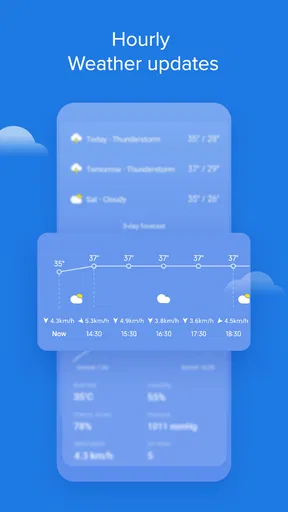
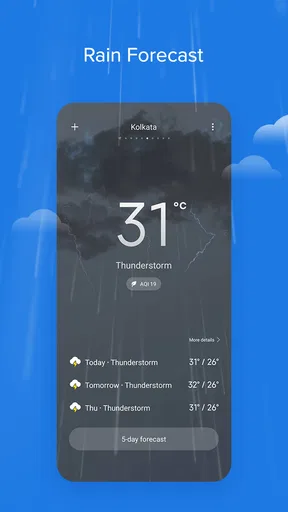
One of the standout features is the real-time weather updates. This isn’t just about knowing if you’ll need an umbrella; it’s about knowing when you’ll need it. The app refreshes regularly, providing up-to-date information at your fingertips. It even offers hourly forecasts, which is perfect if you’re planning a day out and want to avoid any surprises.
Now, let’s talk about the radar maps. These are not your average static maps; they’re dynamic and interactive. You can zoom in and out, explore different areas, and get a visual sense of what’s happening. It’s like having your own personal meteorologist on your phone.
Customization and Details
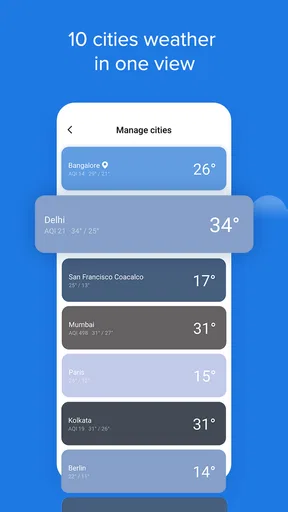
Customization is a breeze. Whether you’re a Celsius or Fahrenheit person, the app lets you switch with just a tap. You can also set up multiple locations, which is a godsend if you travel a lot or have family across the country. Knowing the weather in different places at a glance is super handy.
The widget options are another great feature. You can add a weather widget to your home screen, giving you a quick view without even needing to open the app. It’s available in different sizes and styles, so you can pick what suits your home screen aesthetics best.
Speaking of details, Weather - By Xiaomi doesn’t just stop at temperature and rain predictions. It dives into more specific data like air quality index, wind speed, humidity, and UV index. For those of us who like to nerd out over data, this is a treasure trove!
Usability and Performance
In terms of performance, the app is a champ. It’s lightweight, doesn’t hog your phone’s resources, and loads quickly. I haven’t experienced any crashes or bugs, which is always a relief. The app is available for both Android and iOS, so no one’s left out.
Let’s not forget about the notifications. You can customize alerts for severe weather warnings, so you’re never caught off guard. The alerts are timely and relevant, ensuring you have enough time to prepare for any sudden weather changes.
Weather - By Xiaomi is currently at version G-13.0.2.1, and its release date was April 29, 2020. Those details give existing users a useful point of reference when checking which version they have installed, but a version label alone does not tell me what changed in a particular update. I would judge an update by the behavior I actually notice: whether the forecast view remains clear, saved locations are still convenient, and the information I rely on is easy to reach.
For someone who already uses it, the practical question is less about starting over and more about whether the app still fits the way they check weather. A home-screen widget can make a glance quicker, while opening the full app is better when you want to compare places or look beyond the headline temperature. If you are deciding whether to keep it, try using those two routes for different tasks instead of expecting the widget to replace every detail in the main view.
The developer is Xiaomi Inc., and the app’s large audience is a reassuring sign that it is not an obscure experiment. Still, I would not use popularity as a substitute for checking local usefulness. Weather quality is experienced at the location and time that matter to you; if the outlook repeatedly fails to help with your plans, it is reasonable to compare it with another service rather than remain loyal to an install count.
What to keep in mind as you use it
The strongest habit I would build is to use the app’s different kinds of information for different decisions. Temperature helps with clothing, hourly outlooks can help with timing, and AQI is relevant when deciding how much time to spend outdoors. Wind, humidity, and UV readings add context, but they do not all matter equally every day. Looking for the one detail connected to your plan is more useful than scanning every value by default.
Multiple locations are particularly helpful when a day involves more than one place. I might check home before leaving, then look at the destination before setting out, rather than assuming both locations share the same conditions. The trade-off is that saved places require a little attention: if a location is no longer relevant, keeping it in the rotation can make a quick glance less clear. I’d keep only the places I actively use.
Widgets are convenient, but they also make it easy to mistake a quick snapshot for the complete forecast. I would use one for routine awareness and open the app when the decision has consequences, such as timing a longer outdoor plan. Likewise, a map can be more intuitive than a row of figures when you want a visual sense of conditions nearby, but I would not assume that a broad map view answers every street-level question.
For Android users, the minimum operating system requirement is Android 7.0. The app is free, so the main decision is whether its presentation and forecast are useful for your routine, rather than whether you need to budget for a purchase. It is also listed for iOS, though the experience can differ between platforms; I would judge the version on the device you actually use instead of assuming every control looks identical.
My recommendation after weighing the trade-offs
To wrap things up, Weather - By Xiaomi is more than just a weather app; it’s a comprehensive tool that keeps you informed and prepared. Whether you’re planning a weekend getaway or just deciding what to wear, this app has got your back. It’s reliable, feature-rich, and user-friendly. If you haven’t tried it yet, I’d say it’s definitely worth a download. Trust me, once you start using it, you’ll wonder how you ever managed without it!
So, there you have it! Get out there, enjoy the weather, and let Weather - By Xiaomi guide you through the sunshine and storms. Happy forecasting!
My recommendation comes with one sensible qualification: keep it if the information it presents helps you make better everyday choices, and compare it with another weather source if your location or plans demand more precision. I would not install a second app just to collect more numbers, but I would use another source for a high-stakes outing or when the local outlook seems uncertain. For routine checks, though, Xiaomi’s app offers an approachable place to start.
As you decide whether it belongs on your phone, pay attention to the small points that shape daily use: whether your preferred locations are easy to reach, whether a widget gives you enough context, and whether alerts are helpful rather than distracting. Those are more meaningful tests than judging a weather app by a single forecast. If those habits work for you, it can earn its place as a dependable part of your daily routine; if they do not, a different service may be a better match.
Verdict
Strengths of Weather - By Xiaomi
- User-friendly interface with intuitive navigation.
- Accurate real-time weather updates.
- Customizable widgets for quick access.
- Supports multiple locations for tracking.
- Low battery consumption and efficient performance.
Limitations of Weather - By Xiaomi
- Contains occasional ads that can be disruptive.
- Limited customization for notification alerts.
- Requires internet for full functionality.
- No radar or map features available.
- May not support all global locations.
Similar Picks in This Category
View All
Weather & Radar Forecast
WetterOnline4.8

Weather
OneLouder Apps4.6

AccuWeather: Weather Radar
AccuWeather3.6

The Weather Channel - Radar
The Weather Channel4.6

1Weather Forecasts & Radar
OneLouder Apps4.3

Transparent clock and weather
MACHAPP Software Ltd4.2
You May Also Like
View All


Frequently Asked Questions
What features make Weather - By Xiaomi stand out from other weather apps?
Weather - By Xiaomi offers a clean and intuitive interface, providing real-time weather updates, air quality index, and detailed forecasts. It includes features like severe weather alerts, sunrise and sunset times, and customizable widgets, making it a comprehensive tool for staying informed about the weather conditions.
Is Weather - By Xiaomi free to use or are there any in-app purchases?
Weather - By Xiaomi is free to download and use, providing a wide range of features without any cost. However, it may include optional in-app purchases for advanced features or to remove ads, enhancing the user experience without impacting the app's core functionalities.
How accurate are the weather forecasts provided by Weather - By Xiaomi?
The app sources its data from reliable meteorological services, ensuring high accuracy in forecasts. Users generally report that the app provides precise and timely weather updates, making it a dependable choice for daily and weekly planning. However, as with any weather app, occasional discrepancies may occur.
Does Weather - By Xiaomi support multiple locations for weather updates?
Yes, Weather - By Xiaomi allows users to add multiple locations to track weather conditions in different areas. This feature is particularly useful for frequent travelers or those who want to monitor weather conditions in various cities for personal or professional reasons.
Can I customize the notifications and alerts in Weather - By Xiaomi?
Users have the option to customize notifications and alerts according to their preferences. The app allows you to set alerts for specific weather conditions, such as rain or extreme temperatures, ensuring you receive timely updates tailored to your needs and lifestyle.
